What’s New in the Latest Thermomix® TM7 Update (v1.5)

Hello Thermomix friends!
I love how Thermomix keeps making our time in the kitchen smoother, easier, and so much more fun! The latest software update TM7 Version 1.5 officially rolls out on July 23rd (delayed to July 30th), and it brings some fantastic quality-of-life updates that I know you’re going to love.
Whether you’re a seasoned home chef or just getting comfortable with smart kitchen technology, these new features will take the hassle out of your daily meal prep.
Here is your complete guide to every new feature included in the Thermomix TM7 update v1.5:
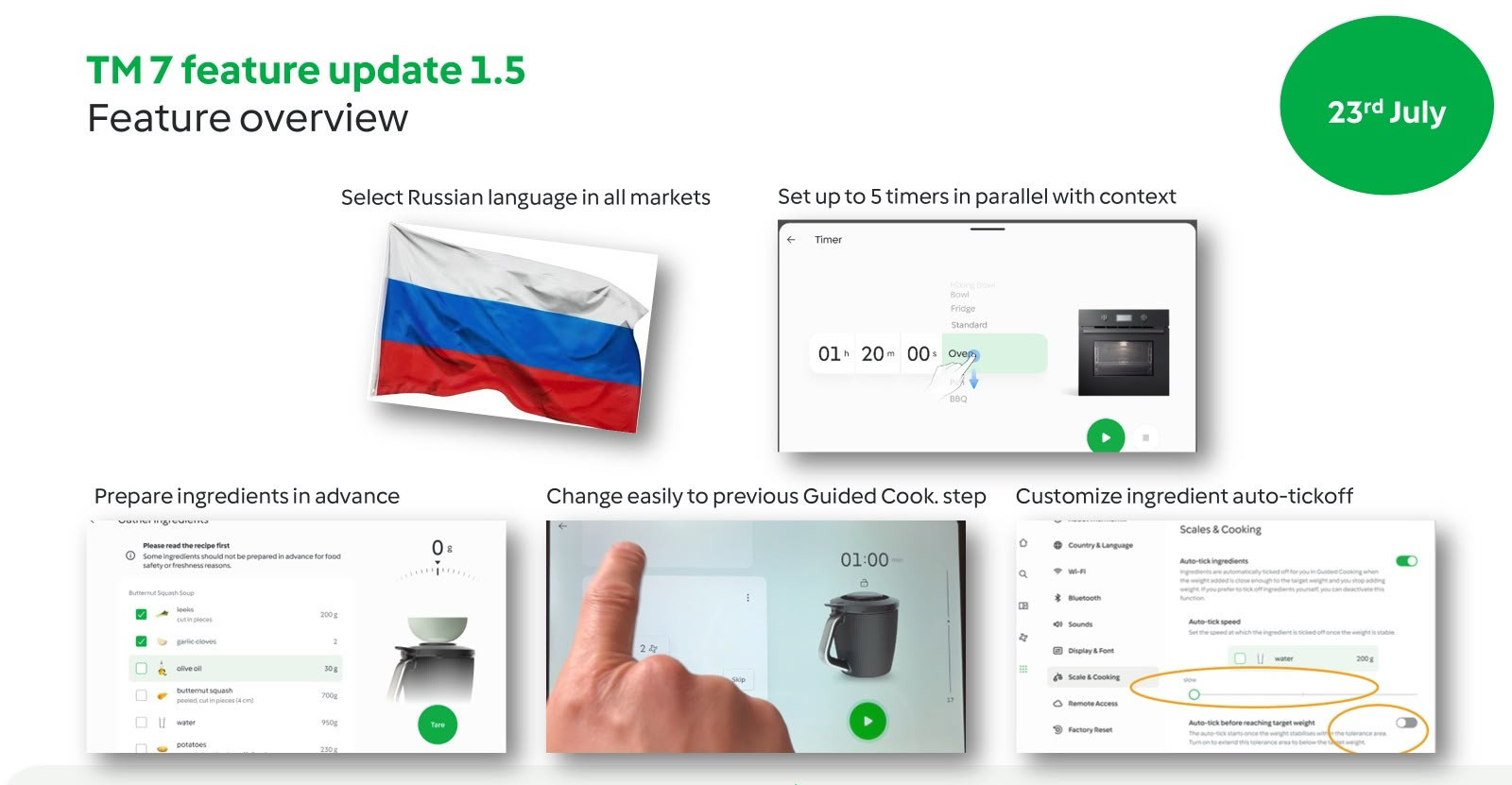
Top Features in the Thermomix TM7 Software Update 1.5
🛒 1. Interactive "Gather Ingredients" Checklist
Before starting any Guided Cooking recipe on Cookidoo®, your TM7 screen now displays an interactive ingredient checklist.
In culinary school, we call this mise en place (getting everything prepped before you even turn on the stove), but in everyday life, it simply means no more frantic pantry searches halfway through a recipe (I'm looking at my husband right now).
With this feature, you can double-check that you have every ingredient on your counter before pressing start.
⬅️ 2. Return to Previous Step in Guided Cooking
This was one of the most requested features from the TM6, and it’s officially back on the TM7! If you ever need to re-read an instruction, double-check a weight, or step away for a moment, you can now hop back to the previous step with a single tap during Guided Cooking.
⏱️ 3. Up to 5 Simultaneous Kitchen Timers
Cooking a main dish, a side, and dessert simultaneously? Or keeping track of something baking in the oven while your TM7 simmers sauce? You can now set up to 5 different timers directly on your TM7 screen to keep your whole kitchen organized.
✅ 4. Customizable Auto-Tick Settings
You now have total control over how your machine automatically checks steps off as you weigh or add ingredients. It allows you to tailor your cooking rhythm so it feels natural to your own workflow.
🇷🇺 5. System Language Expansion
To make the TM7 experience seamless for more families globally, this update adds official Russian language support across the entire system menu and interface.
What’s Next for Cookidoo® and Thermomix?
One of the best parts of owning a Thermomix is seeing how the software continuously evolves! Here is a peek of what Vorwerk is cooking up for future Cookidoo® updates,
AI-Powered Cookidoo® Assistant: Vorwerk is actively developing integrated AI features. Soon, you'll have an intelligent assistant on your device to help customize recipes and answer cooking questions in real time!
How to Install the TM7 v1.5 Update
Updating your machine takes just a few clicks:
Ensure your TM7 is connected to Wi-Fi.
When the update prompt appears on your display, tap Confirm / Install.
Leave your machine plugged in while it installs. It only takes a few minutes!
Join the Conversation!
Have questions about the new features or want to see them in action? Come join me in the next live cook-along or reach out to me on Whatsapp! I’d love to hear which new feature is making your daily cooking easier.
Happy cooking! 💚
Comments